TL;DR
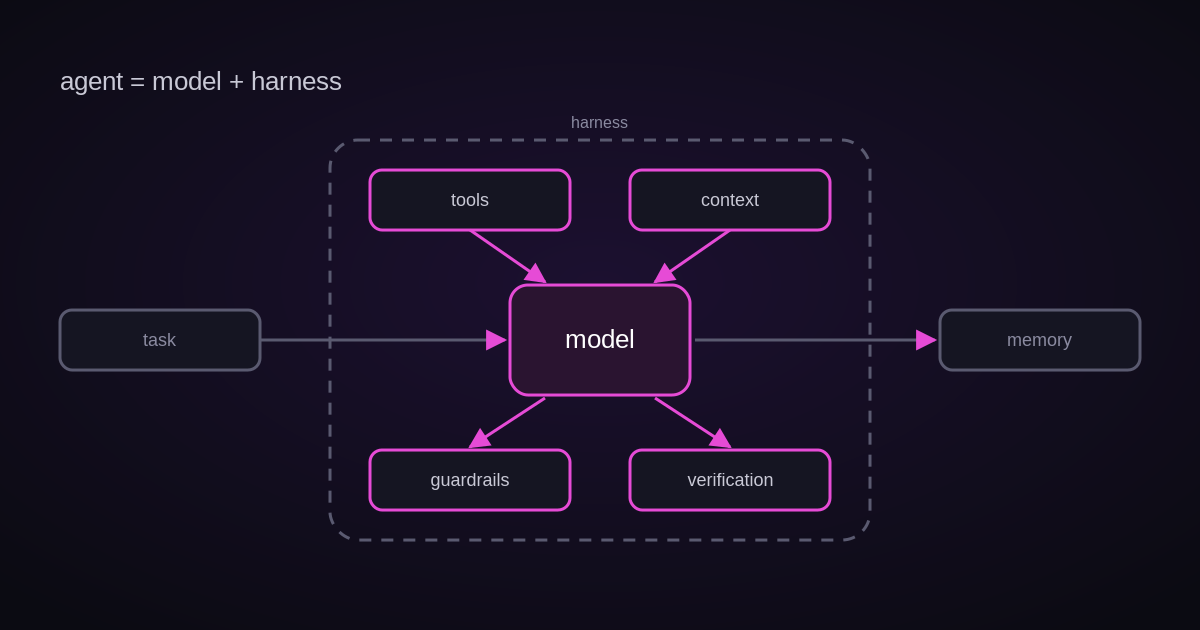
- Agent = model + harness. The harness is everything except the weights: the agent loop, the tools, what goes into the context window, what is remembered between sessions, what the agent may do, and how its work is checked.
- Prompt engineering tuned one message. Context engineering chose what the model sees. Harness engineering designs the whole environment the agent works in, across many steps and sessions.
- Most agent failures in production are harness failures: confusing tools, overflowing context, no memory of earlier progress, no way to verify work, or too much permission.
- Treat the harness as a product: give agents clear tools and maps, durable progress notes, fast automated checks, and tight permissions, then improve it from traces and evals.
Write a longer system prompt and switch to a bigger model
Engineer the harness: tools, context, memory, guardrails, and feedback loops
The parts of a harness
The model decides what to do next. The harness decides what the model can see, what it can touch, and how it finds out whether it was right.
think → call tool → observe → repeatThe control flow that runs the model step by step, handles tool calls, and decides when to stop, retry, or ask a human.
search_orders(customer_id, status)The actions the agent can take. Names, parameters, descriptions, and error messages are the agent's interface, so design them like an API for a new teammate.
compact · summarize · load on demandWhat goes into the context window at each step: instructions, relevant files, tool results. Old, noisy output is trimmed or summarized so the window doesn't fill with junk.
progress.md · task list · git historyDurable notes that survive between sessions, so a fresh context can pick up where the last one stopped instead of starting over.
sandbox · allowlist · approval for writesLimits on what the agent can do and where. Reading is usually safe; deleting, paying, emailing, or deploying needs scoping or a human approval.
tests · linters · schema checks · evalsAutomatic feedback the agent can run itself. An agent that can check its own work fixes its own mistakes; one that can't just reports success.
The term grew out of coding agents. Teams building with tools like Claude Code and Codex found that a better model helped, but the big gains came from the environment around it: clear repository maps, fast tests, progress files, and rules enforced by tooling rather than written in a prompt. The same lessons apply to any agent that works over many steps.
A long-running coding task, two ways
The task: add multi-currency support to an invoicing app. It touches the database, the API, the UI, and the tests. It won't finish in one context window.
“Add multi-currency support to invoices.” (a multi-hour task)
- 01Reads a 3,000-word system prompt and half the repo
- 02Context fills with old file dumps and test logs
- 03New session starts with no memory and redoes finished work
- 04Declares “done” without running the tests
- 01Short AGENTS.md map points to the docs for each area
- 02A feature list in a file; the agent takes one item at a time
- 03After each item: run tests, commit, update progress.md
- 04Next session reads progress.md and git log, then continues
Same model in both columns. The right side succeeds because the harness keeps the context clean, makes progress durable, and lets the agent verify its own work.
async function runAgent(task: Task, harness: Harness): Promise<Result> {
  let context = harness.initialContext(task)            // map, progress notes, task

  for (let step = 0; step < harness.maxSteps; step++) {
    const action = await model.next(context)
    if (action.type === "finish") {
      const check = await harness.verify(task)          // tests, lint, evals
      if (check.passed) return harness.saveProgress(task, check)
      context = harness.append(context, check.report)  // feed failures back
      continue
    }
    if (!harness.isAllowed(action)) {                   // permissions, sandbox
      context = harness.append(context, harness.denied(action))
      continue
    }
    const result = await harness.runTool(action)
    context = harness.compact(harness.append(context, result))
  }
  return harness.handOff(task, context)                 // ask a human
}Where agents fail because of the harness
Forty overlapping tools with vague names; errors return a stack trace.
Fewer, clearly named tools with examples, and error messages that say what to do next.
Every file read and test log stays in context until the important instructions are buried.
Trim or summarize old tool output, and load details on demand instead of up front.
A new context window starts from zero and rewrites work that was already done.
Keep progress notes, a task list, and commits the next session reads first.
A giant instruction file covers everything, so the model follows none of it reliably.
A short map that links to focused docs, with hard rules enforced by linters and tests.
The agent can't run the app or the tests, so it guesses and reports success.
Give it fast, deterministic checks it can run after every change.
The agent has production credentials and runs a destructive migration.
Sandbox by default, least-privilege credentials, and human approval for irreversible actions.
How much harness do you need?
Keep it simple
For short, single-step tasks, a good prompt, a few well-described tools, and basic logging are enough. Don't build infrastructure you won't use.
What it costs
A useful rule: when the agent makes a mistake, ask what in the environment let it happen, and fix that, rather than adding another sentence to the prompt. A missing test, a confusing tool, or an unclear doc usually explains the failure better than the model does.
How to build a harness
- 01Pick one real, repeated task and collect 20 to 30 examples with known good outcomes.
- 02Run the agent on them with full trace logging, and label where each failure came from.
- 03Fix the tools first: clear names, fewer overlaps, helpful error messages.
- 04Add checks the agent can run itself, and make it run them before it reports “done”.
- 05For long tasks, add a task list and progress notes the agent updates and reads at the start of each session.
- 06Set permission tiers and a sandbox, re-run your examples after each change, and track the success rate over time.
Tooling options
The harness behind Claude Code as a library: agent loop, tools, context compaction, permissions, and hooks.
Agents, tools, handoffs, guardrails, and built-in tracing for multi-step workflows.
An open protocol for exposing tools and data to agents once, then reusing them across harnesses.
Record every step an agent takes, review failures, and run evals as you change the harness.
More guides
Want this built into your workflow?
I help small and mid-size teams decide what to build, then build it, from the first eval set to production guardrails.
Talk through your use case