TL;DR
- Prompting a model to avoid mistakes doesn't make errors go away; it makes them harder to see. In production, some outputs will be wrong. The question is which ones reach the customer.
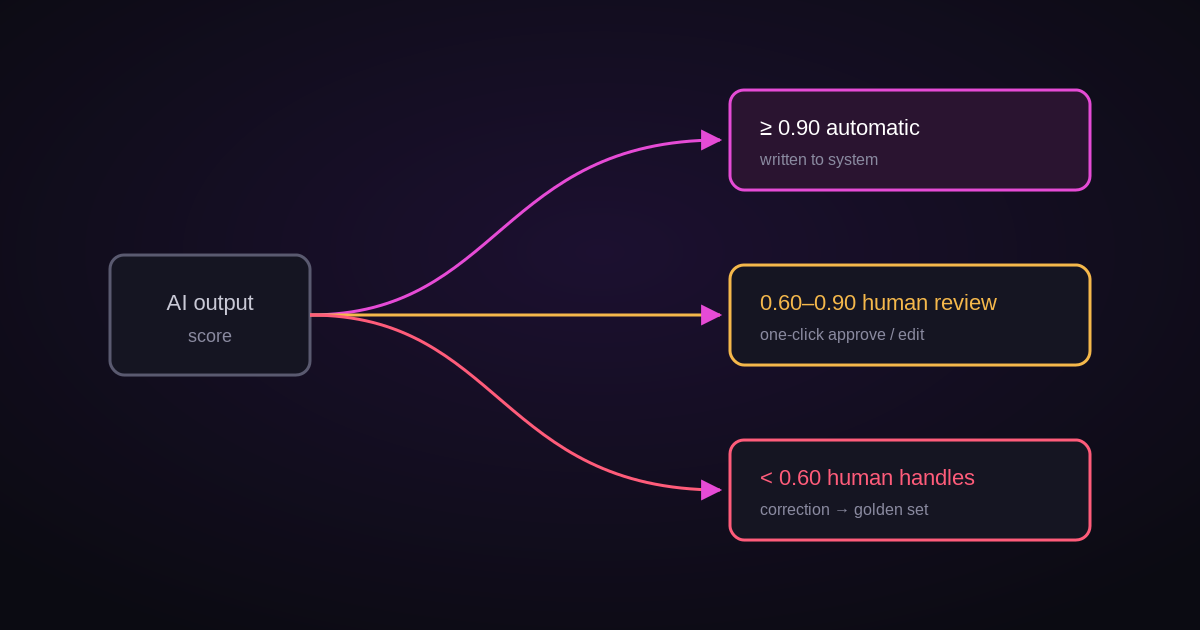
- Score confidence on every output, then route explicitly: high → automatic, medium → a human reviews, low → a human handles it or the system asks for more information.
- Confidence must come from signals you can check (schema validation, agreement between samples, retrieval scores, business rules) and be calibrated on your golden dataset. A model saying “I'm 95% sure” is not a signal.
- Thresholds are a business decision: the cost of an error versus the cost of a review. Start conservative and widen automation as the data proves it safe.
Try to prompt the LLM into not making mistakes
Confidence-based human-in-the-loop with explicit routing
Four parts of confidence routing
schema ok · 3/3 samples agree · totals reconcileChecks you can compute. Combined into one score per output, or per field.
≥ 0.9 auto · 0.6–0.9 review · < 0.6 humanSet per action, based on what an error costs. Sending a newsletter and issuing a refund get different bars.
one screen, source + output + why flaggedReviewers see the evidence and fix the output in one click, so reviewing is faster than doing it by hand.
correction → golden datasetEvery human correction becomes training data for evals, prompts, and threshold tuning.
Invoice extraction into accounting, two ways
An SMB receives a few hundred supplier invoices a month. The AI extracts vendor, amounts, and due date into the accounting system.
A blurry, handwritten invoice where the total doesn't match the line items.
- 01Prompt: “Be very careful. Double-check all numbers.”
- 02Model returns a confident, well-formatted total
- 03Total is wrong; it's written to accounting
- 04Found at month-end reconciliation, if at all
- 01Check: line items don't sum to total → score drops
- 02Check: two extraction passes disagree on due date
- 03Score 0.52 → routed to the review queue with both flags shown
- 04Reviewer fixes it in 20 seconds; the case joins the golden set
Clean invoices still flow through automatically. Humans only see the ones the checks couldn't vouch for.
function route(output: Extraction, src: Invoice): Route {
  const signals = [
    schemaValid(output),                       // 0 or 1
    lineItemsReconcile(output),                // sum(items) ≈ total
    agreement(output, secondPass(src)),         // 0..1 across fields
    vendorKnown(output.vendor),                // matches vendor master data
  ]
  const score = weightedScore(signals)          // weights fit on golden data

  if (score >= THRESHOLD.auto)   return { kind: "auto" }
  if (score >= THRESHOLD.review) return { kind: "review", flags: failed(signals) }
  return { kind: "manual", flags: failed(signals) }
}Where HITL goes wrong
Asking the model “how sure are you?” returns confident numbers that don't track actual accuracy.
Use external, checkable signals and verify on labeled data that high scores really are more accurate.
Every output goes to a human. Reviewers start rubber-stamping and the AI saves no time.
Only uncertain outputs are reviewed, so reviewers pay attention to the ones that matter.
Wrong outputs look exactly like right ones and go straight to the system of record.
Low-confidence outputs can't reach the write step without a human decision.
The reviewer sees only the AI's answer and has to redo the work to check it.
Show the source, the output, and which check failed, side by side.
Thresholds set on day one are never revisited, so automation never grows.
Review accuracy per band monthly; widen the auto band when the data supports it.
Does your workflow need confidence routing?
Automate with spot checks
Low-stakes output can flow automatically. Sample a few per week for quality and add them to your eval set.
What it costs
How to set it up
- 01List the actions the AI takes and what an error costs for each.
- 02Choose two to four checkable signals per action: schema, reconciliation, agreement, known entities.
- 03Score your golden dataset and check that accuracy rises with the score.
- 04Set conservative thresholds: more goes to review at first.
- 05Build a review screen with the source, output, and failed checks side by side.
- 06Log every correction into the golden set; revisit thresholds monthly and widen automation as accuracy holds.
Tooling options
A status column, a simple internal page, and a notification. Covers most small teams.
Ready-made annotation and review interfaces you can self-host.
Route traces to reviewers and turn their feedback into datasets.
Make review a state with REVIEW_APPROVED / REVIEW_EDITED events; the audit trail comes for free.
More guides
Want this built into your workflow?
I help small and mid-size teams decide what to build, then build it, from the first eval set to production guardrails.
Talk through your use case