TL;DR
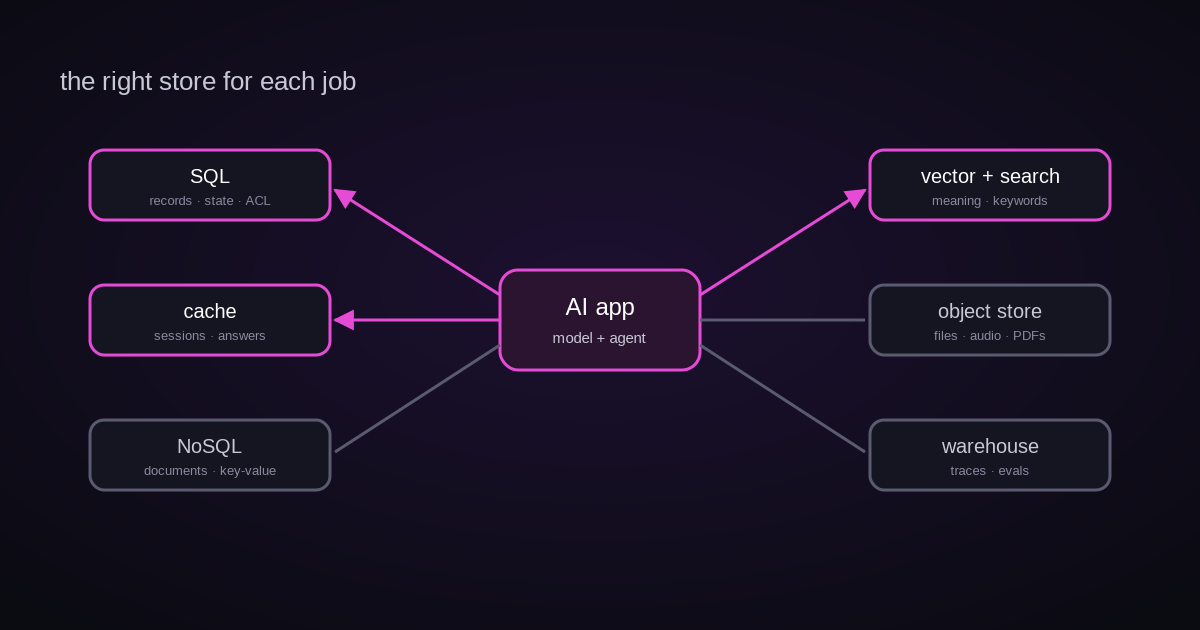
- There is no single “AI database”. A production AI system usually needs a system of record (SQL), fast temporary state (cache), file storage (object store), and some form of search (keyword, vector, or both).
- Relational databases like PostgreSQL remain the backbone: users, permissions, billing, workflow state, and audit logs need transactions and joins. With pgvector and full-text search, Postgres can also cover search for small and medium corpora.
- NoSQL earns its place for flexible or massive data: document stores for varied JSON records, key-value stores for huge request volumes, graph databases for relationships, and time-series or warehouses for analytics.
- Cache sits in front of everything: sessions, rate limits, tool results, and semantic caches of model answers. Treat cached data with the same access rules as the source, and give every entry an expiry.
Put everything into one vector database and hope it scales
Postgres as the system of record, plus cache, object storage, and search added for specific jobs
The main kinds of storage, and what each is for
Each type of store is built around one access pattern. Problems usually start when a store is used for a pattern it wasn't designed for.
PostgreSQL · MySQL · SQL ServerTables, joins, and transactions. The source of truth for users, roles, orders, workflow state, and audit logs, where data must be consistent and correct.
MongoDB · Firestore · Cosmos DBJSON documents with flexible fields. Good for records whose shape varies, such as extracted form data or chat transcripts with mixed content.
DynamoDB · Cassandra · BigtableLookups by key at very high volume with predictable latency. Good for per-user session history or event streams at scale. Weak at ad-hoc queries.
pgvector · Pinecone · Qdrant · WeaviateFinds items with similar meaning by comparing embeddings. Used for semantic search, recommendations, deduplication, and semantic caching.
Elasticsearch · OpenSearch · Postgres FTSKeyword search with ranking, filters, and facets. Still the best at exact terms, IDs, and product codes, which embeddings often miss.
Neo4j · Amazon NeptuneEntities and relationships, queried by following links. Good for knowledge graphs, org structures, and fraud or dependency analysis.
Redis · Valkey · MemcachedVery fast, temporary storage in memory. Sessions, rate limits, queues, recent tool results, and cached model answers, each with an expiry time.
S3 · GCS · Snowflake · BigQueryObject storage holds files: PDFs, audio, images, model outputs. Warehouses hold large historical data for analytics, reporting, and building eval sets.
Which AI data belongs in which store
An HR policy assistant, two ways
A 5,000-person company wants an assistant that answers HR questions, cites the policy, and can open a leave request on the employee's behalf.
“How many vacation days do I have left, and can you book Dec 22–26 off?”
- 01Embed the question and fetch similar chunks
- 02Gets the general vacation policy, but not this employee's balance
- 03No transaction to book the leave; writes a note into the vector store
- 04Any employee's question can match another employee's stored chats
- 01Postgres: look up the employee, their country, and leave balance
- 02Search (keyword + vector) over policies for that country only
- 03Postgres transaction: create the leave request and log the action
- 04Redis: cache the policy answer for others in the same country, 24h
The vector index is still useful, but only for finding the right policy text. Facts about a person and actions that change data belong in the system of record.
async function handleQuestion(userId: string, question: string): Promise<Answer> {
  const user = await db.users.findById(userId)            // Postgres: identity, role, region
  if (!user) throw new Error("Unknown user")

  const cacheKey = `policy:${user.region}:${normalize(question)}`
  const cached = await redis.get(cacheKey)                // Redis: shared, non-personal answers
  if (cached) return JSON.parse(cached)

  const passages = await search.hybrid(question, {        // keyword + pgvector
    filter: { region: user.region, visibleTo: user.role },
    limit: 8,
  })
  const balance = await db.leave.balanceFor(user.id)      // personal facts from SQL
  const answer = await model.generate({ question, passages, balance })

  if (!answer.usesPersonalData) {
    await redis.set(cacheKey, JSON.stringify(answer), { EX: 86_400 })
  }
  await warehouse.log({ userId, question, cost: answer.cost }) // traces for evals
  return answer
}Common storage mistakes in AI systems
Customer records live only as embeddings plus metadata in the vector index.
Keep the source of truth in SQL or object storage. The index is a derived copy you can rebuild.
Documents are embedded into one shared index, and search returns chunks the user isn't allowed to see.
Store owner and access fields with every chunk, and filter by the user's permissions on every query.
A policy is updated, but its old chunks stay in the index and keep being cited.
Version documents, re-embed on change, and delete old chunks in the same job.
Agent state lives only in Redis; a restart or memory eviction loses hours of work.
Use cache for speed only. Anything you can't afford to lose goes to a durable store.
A small team runs Postgres, MongoDB, Pinecone, Neo4j, and Elasticsearch for a pilot.
Start with Postgres (plus pgvector and full-text search), Redis, and S3. Add a store when you hit a measured limit.
The team switches embedding models and finds that every stored vector is now incompatible.
Record the model and version with each vector, keep the source text, and plan for full re-indexing.
Do you need more than Postgres, Redis, and S3?
Postgres, Redis, and S3 are enough
Use Postgres for records, state, pgvector, and full-text search; Redis for cache and sessions; S3 for files. One database to back up, secure, and monitor.
What each choice costs
Embeddings can leak information about the text they came from, so they need the same protection as the original documents. A right-to-delete request has to reach the database, the vector index, the cache, the object store, and the logs.
How to design the storage layer
- 01List every kind of data the AI system reads or writes: records, files, conversations, embeddings, state, logs.
- 02For each, write down how it's accessed: by ID, by query, by meaning, by relationship, or in bulk for analytics.
- 03Start with Postgres as the system of record, S3 for files, and Redis for cache and sessions.
- 04Add pgvector and full-text search in Postgres; measure search quality and latency on real questions.
- 05Attach permissions, version, and source ID to every derived copy (chunks, vectors, cache entries).
- 06Move a workload to a specialized store only when measurements show Postgres can't handle it.
Tooling options
Relational data, JSON columns, full-text search, and vector search in one database. Supabase and Neon offer it managed.
Caching, rate limits, queues, and vector similarity for semantic caches, all with expiry built in.
For very large vector collections, strict latency targets, or advanced filtering beyond what pgvector handles well.
DynamoDB for key-based access at massive scale; MongoDB for flexible document data with rich queries.
Mature full-text search with ranking and facets, plus vector fields for hybrid search.
Durable file storage, and a warehouse for traces, usage, and building eval datasets.
More guides
Want this built into your workflow?
I help small and mid-size teams decide what to build, then build it, from the first eval set to production guardrails.
Talk through your use case